“COB or SMD?” is often one of the first questions buyers ask when choosing an indoor LED display. It is also not the most useful question to answer on its own.
Choosing a COB LED display or an SMD LED display starts with understanding the installation process. How close will people be to the screen? Could the LED surface be touched? Does the display need to handle dark content well? What happens if a module fails? Can replacement modules still be matched several years later? And does the higher price of COB actually solve a problem the project has?
These are the points that usually separate one suitable LED display from another.
1. What Exactly Are COB and SMD?
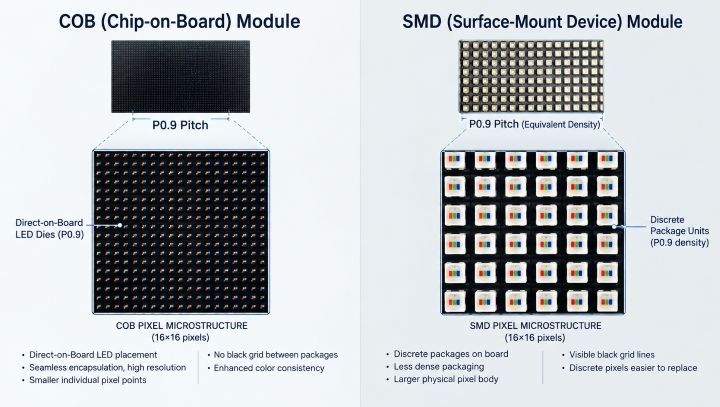
COB stands for Chip on Board. The LED chips are mounted directly onto the board and can be connected to the board using different bonding methods, such as wire bonding or flip-chip bonding, before being packaged and protected as part of the board surface.
SMD stands for Surface-Mount Device. The LED is manufactured as a packaged component before being soldered onto the PCB.
The PCB itself is not an alternative to COB or SMD. Both technologies use circuit boards; the difference is how the LED is packaged and mounted.
That difference can affect the physical appearance of the pixel surface and some aspects of maintenance. It does not determine the entire performance of the finished display. Driver ICs, scan configuration, PCB design, calibration, image processing, optical structure and mechanical construction all have an influence.
For this reason, a meaningful comparison should be made between specific COB and SMD products under comparable conditions.
2. What Should You Compare in Image Quality?
Image quality depends on how the display performs under your project’s viewing conditions. Start by comparing surface reflections and pixel visibility, then assess low-gray detail and off-center viewing at the intended operating brightness.
2.1 Surface and pixel appearance
Fine-pitch LED displays are often viewed from relatively short distances, so the surface itself can become part of the viewing experience.
COB and SMD use different pixel structures and can therefore have different surface appearances. Reflection also varies between products.
Black content is worth checking in person. A darker or less reflective surface may make dark scenes appear deeper under certain indoor lighting conditions. The result depends on the actual surface treatment, brightness setting and room lighting.
2.2 Low-gray performance
Do not judge an LED wall only from bright promotional videos.
Ask for dark scenes, gray gradients, shadows and other low-gray content at the brightness level used in the project. This can reveal differences in calibration, LED consistency, driver behavior and image processing.
A specification such as “16-bit grayscale” does not tell you how the display will look in every dark scene. The actual image is what needs to be checked.
2.3 Viewing angle
Look at the screen from the positions where people will actually sit or stand.
Check brightness changes and color consistency as you move away from the center. This can be particularly relevant when evaluating an indoor LED video wall for meeting rooms, control rooms and retail environments where viewers are spread across the room.
For camera applications, add another test: use the actual camera with realistic shutter and frame-rate settings. Flicker, banding and scan artifacts may not be obvious to the eye but can become visible on camera.
3. How Much Protection Does a COB Surface Really Provide?
The protective structure used on many COB LED displays can reduce the chance of damage from certain types of contact. This can be useful where people work close to the screen or where occasional touching is expected.
It should not be taken as a general impact or environmental rating.
A product that survives pressing or light contact during a demonstration has not necessarily been tested for a specific impact level, water exposure or chemical cleaning. Those claims need to be tied to the actual product and test conditions.
Before specifying protection as a requirement, ask the supplier:
-
What was tested?
-
How was it tested?
-
Does the test apply to the exact model?
-
What cleaning methods are allowed?
-
What limitations apply to the warranty?
The answer should come from product documentation or test records rather than the COB name itself.
4. What Happens When a Module Fails?
A module that can be removed from the front is easier to deal with than one that requires major disassembly. But module replacement is only one part of maintenance.
Some faults are limited to the module. Others may involve the PCB, receiving card, power supply or other electronics. A site technician may replace a module, while a deeper fault still needs specialist diagnosis or factory repair.
Before ordering, find out:
-
Which parts can be replaced on site?
-
Is front access available?
-
How is a faulty module diagnosed?
-
Does a replacement require recalibration?
-
Which repairs need to be returned to the factory?
-
How are replacement modules supplied?
For a commercial installation, the repair process should be considered before the screen goes into operation.
5. What About Spare Modules Several Years Later?
This is easy to overlook when everything is new.
A spare module may have the correct dimensions but still differ in electrical revision, firmware, calibration data or receiving-card compatibility. It may work electrically and still look different from the surrounding modules.
That is why long-term spare management deserves attention during the initial purchase.
Confirm the exact module model and revision. Ask whether calibration information will be retained and how future replacement modules will be matched with the installed screen.
For a large or business-critical display, the availability and compatibility of spares can have a direct effect on maintenance costs and downtime.
6. What Problem Is the COB Premium Supposed to Solve?
This is a more useful way to look at the price difference.
For a fine-pitch wall viewed from close range, particularly when comparing P1.2 COB and SMD displays, the surface and pixel appearance may be important. Where physical contact is expected, the protection provided by a particular COB design may also be relevant. High-density information displays deserve careful testing of low-gray performance and uniformity.
The question is whether those characteristics matter enough in the actual installation to justify the additional cost.
A buyer should be able to point to a specific requirement and explain why the selected COB product addresses it.
7. When Does SMD Still Fit the Project?
SMD remains a practical choice for many indoor applications.
If a particular SMD display already provides the required image quality at the intended viewing distance, and the screen will be installed in a controlled environment with little physical contact, there may be little reason to pay for features the project does not need.
Existing technicians, established spare-parts channels and familiarity with a particular SMD product family can also simplify long-term service.
The purchase price is only one part of the calculation. Consider the cost of spares, repair arrangements, technician time and potential downtime alongside the initial quotation.
8. How to Compare COB and SMD Fairly
A side-by-side test is useful only when the basic conditions are comparable.
Try to match:
-
Display size
-
Native resolution and pixel pitch
-
Brightness
-
White point
-
Calibration
-
Content
-
Ambient lighting
-
Viewing distance
For camera-facing projects, use the intended camera and realistic shooting settings.
The test content should include more than bright video. Use dark scenes, gray gradients, fine text and representative project content.
One more point is often missed: test from the actual viewing positions. If a difference can only be seen from 30 cm away but the nearest viewer will normally stand several metres from the screen, that difference may have little practical value.
9. Practical Selection Framework
|
Project Consideration
|
COB May Be More Suitable When
|
SMD May Still Be Suitable When
|
|
Close Viewing
|
Fine-pitch image quality and surface appearance are important at short viewing distances.
|
The selected SMD product already meets the viewing requirements.
|
|
Surface Protection
|
People are likely to touch the display during normal use.
|
Physical contact with the screen is unlikely.
|
|
Image Quality
|
Low-gray performance, surface appearance and close-range viewing are important evaluation points.
|
The selected SMD product has already passed the required image-quality tests.
|
|
Maintenance
|
The product's service design and protection features fit the planned maintenance method.
|
Existing technicians and spare-parts arrangements already support the SMD product effectively.
|
|
Budget
|
The additional cost can be linked to a specific project requirement.
|
The project places greater emphasis on controlling the initial investment.
|
The table is a starting point for discussion, not a substitute for product testing. The same project may lead to different choices depending on the actual products being compared.
10. Frequently Asked Questions About COB and SMD
Q1. Can I compare COB and SMD samples if they have different pixel pitches?
A1: It is difficult to draw a useful conclusion from that comparison. Pixel pitch changes pixel density, viewing distance and the appearance of the image. Samples should be as closely matched as possible before judging the effect of the packaging technology.
Q2. Should both samples be tested at the same brightness setting?
A2: Not necessarily. A matching percentage on two different displays does not mean they are producing the same measured brightness. For a fair comparison, define the target operating brightness and test both displays under that condition.
Q3. What information should I keep from the supplier after installation?
A3: Keep the exact module model and revision, calibration information, receiving-card configuration, firmware details and relevant maintenance instructions. This information can save considerable time when replacement work is needed later.
Q4. What if the LED wall will be installed behind glass?
A4: Check reflections, viewing angle and brightness under the actual glass and room-lighting conditions. The surface characteristics of the LED display can become more noticeable when additional reflective surfaces are introduced.
Q5. If the COB price is only slightly higher, should I just choose COB?
A5: Look at what the price difference buys. If the additional features address a requirement that has been identified and tested, they may have practical value. If the project does not need those features, the price difference alone does not establish a technical reason to change the specification.
Conclusion
COB and SMD are different ways of packaging LEDs, and the better fit depends on the finished product and the installation.
Compare the displays under realistic conditions, check protection claims against test information, and confirm the repair and spare-parts arrangements before placing the order.
Planning an indoor LED wall?
Send Premteco your viewing distance, screen size and application requirements, and our LED engineers can help you compare suitable COB and SMD options.




