A meeting room LED wall can play video clearly while the back row cannot read a spreadsheet. Establish what each seat must read, what image fits the wall and how the meeting system displays content. Then compare pixel pitch and picture quality.
What Room and Content Data Should You Collect Before Choosing an LED Wall?
Mark the nearest, farthest and most off-axis seats. Measure seated eye positions to the installed active display surface and note side angles. The farthest seat constrains text size; the nearest reveals pixel structure and comfort; side seats expose obstructions, reflections and colour shifts. Headcount alone is insufficient.
On an elevation, mark usable wall dimensions, table and eye heights, proposed screen edges, windows, lights, camera and speakers. Check whether front seats obstruct the image or a raised screen forces prolonged upward viewing. The camera must cover seats with a natural remote eyeline. Include mount and cabinet depth.
Record blinds, lighting and affected seats during the brightest meeting period. General ambient light reducing contrast differs from a reflection covering a figure; room illuminance alone cannot specify screen brightness.
Collect real slides, dense spreadsheets, captioned video and the conferencing platform's shared-content layout. Ask users to identify the smallest figures, words and captions the farthest seat must read accurately, and what may be enlarged or simplified. Reading only table headings presents a different requirement from reading every cell.
How Do You Determine LED Wall Size and Pixel Pitch for a Meeting Room?
Use Real Meeting Content to Select an Active Image Size
Subtract installation clearances from wall width. Calculate height from the intended aspect ratio; check sightlines, screen edges and camera space. This yields a candidate that may fit, not proof of readability. Show real files at that physical size in full-screen and conferencing layouts. Have users at the farthest seat read specified figures and captions; log errors. If needed, enlarge the text or shared window and retest. If that fails, consider a larger image or revised seating.
In a hypothetical room, usable wall dimensions are 3.9 m wide by 2.3 m high. Seats range from 3 m to 8 m from the screen plane. Start by testing a 3.6 × 2.025 m active image at 16:9. This is a candidate based on available wall space, not a recommended size calculated from the 8 m viewing distance. Check the actual cabinet layout, mounting structure, screen height and camera position to see whether it fits. The farthest-seat reading test determines whether it is large enough.
Suppose a critical number occupies 3% of the full-screen image height, appearing about 61 mm tall. In a split-screen layout it occupies 1.5%, appearing about 30 mm tall. Test both layouts from 8 m; height alone cannot establish readability. If the split-screen number is misread, enlarge shared content or revise the file. Finer pitch cannot increase the character's physical height.
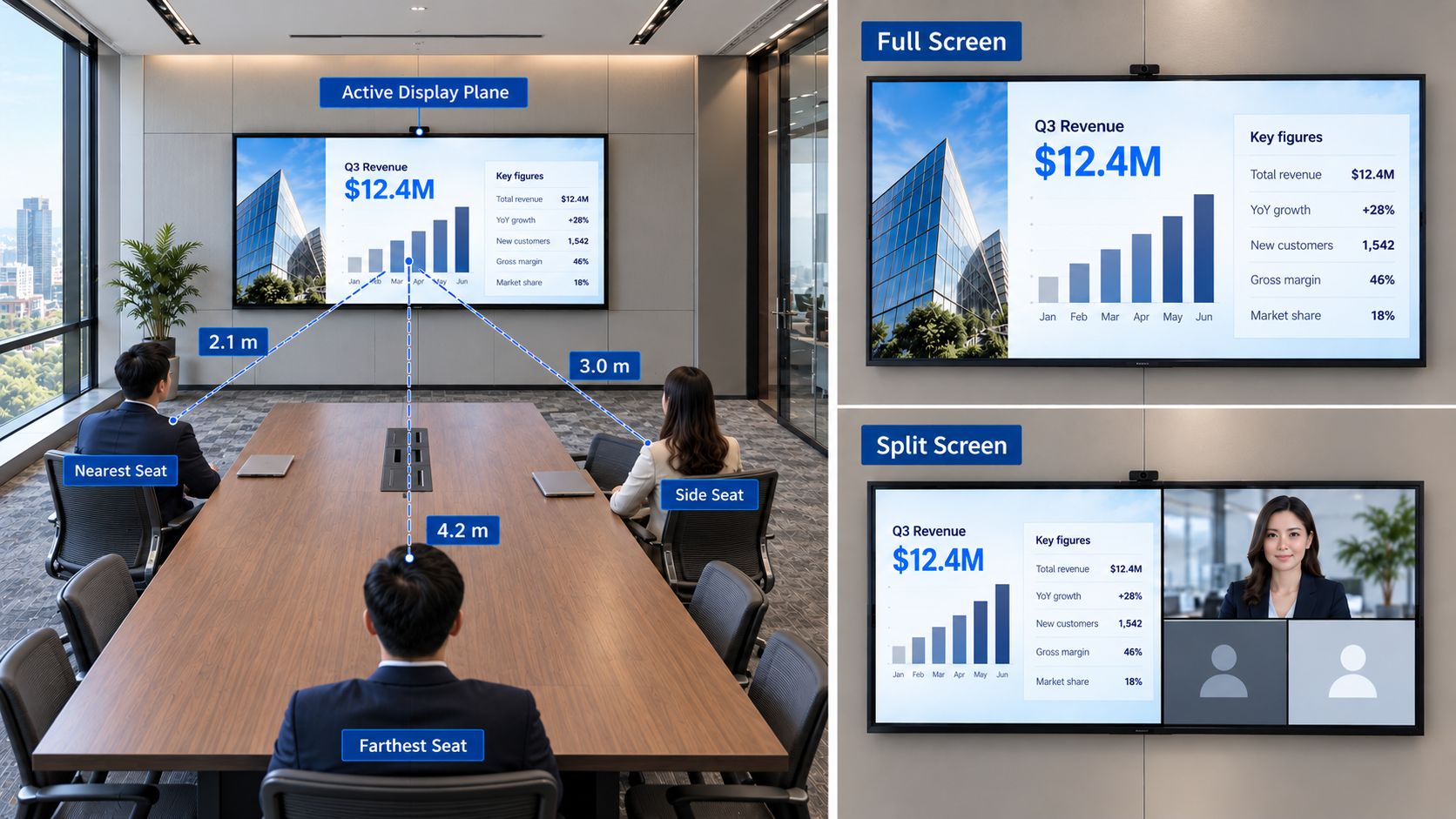
Calculate the Native Pixel Matrix at the Chosen Size
At a fixed size, horizontal pixels ≈ active width (mm) ÷ actual pixel pitch (mm); calculate height likewise. Compare the same 3,600 × 2,025 mm image:
|
Assumed pitch
|
Estimated native matrix
|
Vertical pixels across a character 3% of screen height
|
Nearest-seat question
|
|
1.25 mm
|
2880 × 1620
|
About 49
|
Are numbers, fine lines and captions clear?
|
|
0.9375 mm
|
3840 × 2160
|
About 65
|
Is additional detail visible and worth the cost?
|
At 1.5% of screen height, it spans about 24 and 32 vertical pixels. Counts alone cannot predict legibility. Check physical size from the back, then strokes and pixel structure from the front using real files. Choosing COB LED pixel pitch for your viewing distance helps shortlist options; testing and budget decide. Verify modules, cabinets and mapping.
Clarify “4K” in each quotation. A computer's 3840 × 2160 output is the incoming signal; the processor may scale it; the wall's native matrix defines its physical pixels. This identifies what the budget buys and where text blurs. The 1.25 mm wall maps 4K to 2880 × 1620; inspect scaled text. The 0.9375 mm wall has 3840 × 2160 pixels but cannot restore content compressed by a meeting platform. If native 4K is required, calculate how pixel pitch determines COB LED wall size and resolution, then verify signal and mapping.
How Should You Evaluate Brightness, Reflections and Low-Gray Picture Quality?
Judge picture quality at the operating brightness intended for meetings, not a maximum-output showroom setting. Show white slides and spreadsheets under the brightest and normal room lighting: text must remain readable without large white areas becoming uncomfortable. Record separate day and evening presets if needed, and make switching straightforward. Decide how many nits a COB LED display needs through in-room readability and comfort, rather than its peak specification.
Test reflections separately. From central and side seats, view a dark chart with the blinds in normal positions. If a window or luminaire obscures a critical figure, adjust blinds, light direction, screen position or surface option before retesting. Raising output does not remove the reflected image.
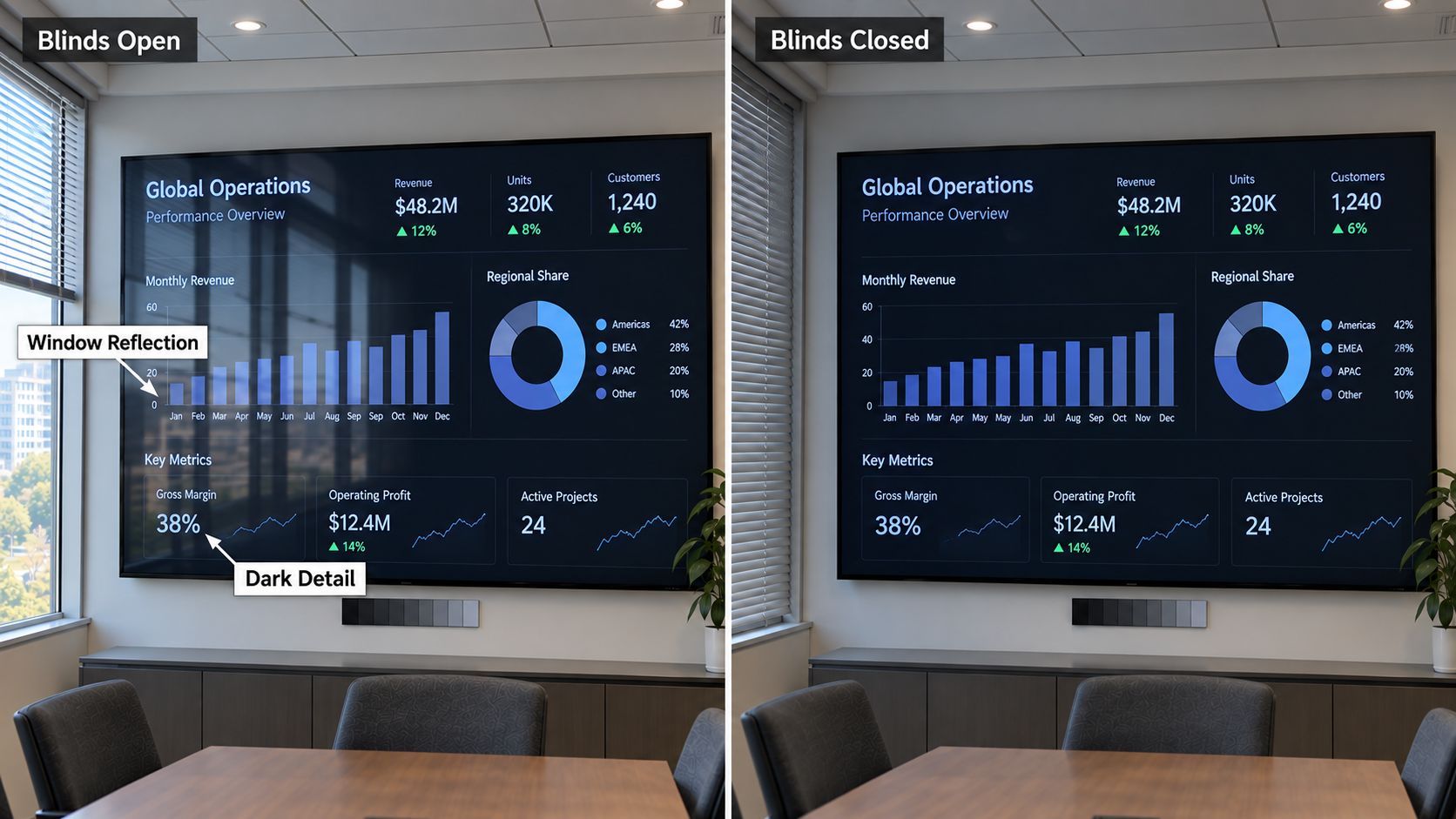 At operating brightness, inspect dark-gray gradients, faces and a large white field. Look for lost shadow steps, unusual white balance and visible differences between neighbouring cabinets. Compare candidates with consistent white point, gamma and calibration. Published bit depth does not establish low-brightness performance; check off-axis seats if they are regularly occupied.
How Do USB-C, Wireless Sharing, Audio and Video Meetings Affect the Display?
The laptop image may pass through USB-C or wireless sharing, a switcher and an LED processor. A changed resolution, aspect ratio or shared-window size can invalidate the earlier content test. Use the same files and layouts when testing the completed system.
Open slides and spreadsheets; switch between intended wired and wireless inputs; join a meeting and show shared content beside remote participants; play video with sound; then disconnect and reconnect. Record window size, output resolution, ratio, switching and recovery times, audio destination and disruptive delay. If a spreadsheet becomes unreadable only in a call, check the platform layout, transmission quality and scaling before changing the wall.
Check camera framing and eyeline from occupied seats. USB-C, wireless sharing, audio routing and platform compatibility are system functions, not COB packaging features. Assign configuration and fault-support responsibilities in the delivery plan.
What Installation, Front-Service and Thermal Space Does the LED Wall Need?
Cabinet thickness alone cannot establish installed depth. An installation section must include cabinets, mounts, wall levelling, connectors, cable bends, camera and speaker space, plus the required cooling paths. Verify structural support, power and air conditioning, then confirm that the active image and camera still fit.
Define “front service” by component: can technicians reach and replace the modules, power supplies, receiving cards and connectors after installation? How will they restore mapping and calibration? Request a replacement demonstration in the proposed mounted configuration, including furniture and finishes that might obstruct access. When comparing integrated and separate COB display electronics, check fault isolation, replacement scope and spares rather than relying on the architecture label.
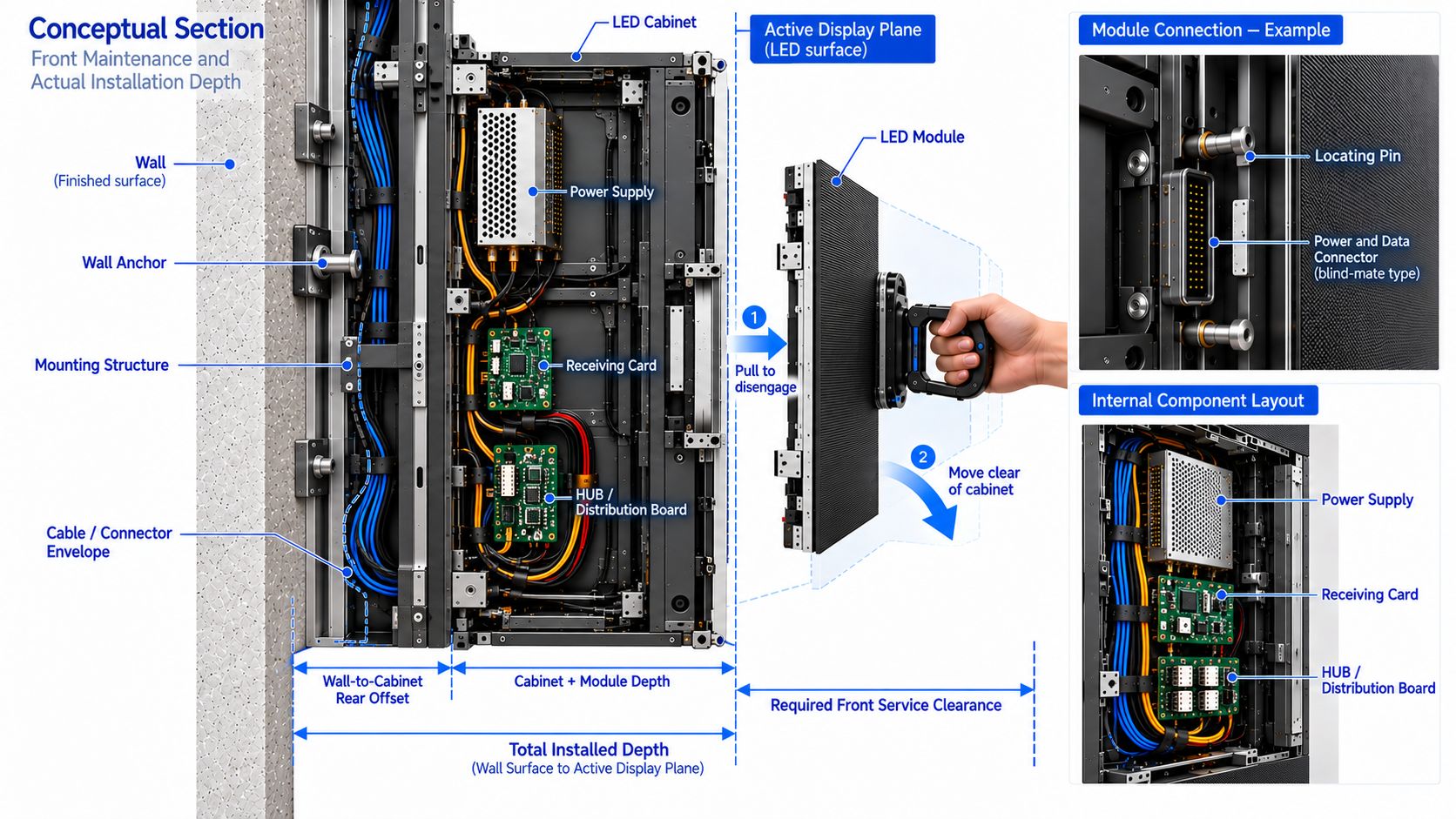 Obtain power and cooling figures at planned brightness and maximum operation. After a meeting-length run, listen from the seats for noise from the wall, processor, power rack and cooling equipment. Fanless cabinets do not guarantee a quiet system.
How Should You Test the Meeting Room LED Wall Before Acceptance?
Agree on file versions, input and output resolution, window layout, operating brightness, white point, lights and blinds before testing. Where possible, use several adjoining cabinets with the intended surface, controller and calibration; one cabinet cannot reveal whole-wall joins or uniformity.
Specify seats, material and pass conditions for each test below. Record failures and repeat failed tests under the same conditions after correction.
|
Test
|
Evidence of acceptance
|
Check first if it fails
|
|
Back-row reading
|
Designated figures, names and captions read accurately; errors logged
|
Text size, split-screen layout, image size
|
|
Front and side seats
|
Essential strokes visible; no reflection or obstruction hides information
|
Scaling, pitch, blinds, lighting, position
|
|
White, gray and faces at working brightness
|
No joins, shifts or lost shadows that impair agreed use
|
Presets, calibration, processing
|
|
Sharing, calls, audio and reconnection
|
Agreed window size, ratio and operation maintained
|
Output, transmission, routing, switching
|
|
Replacement and continuous run
|
Parts accessible; cooling and noise meet project criteria
|
Clearance, spares, ventilation, rack
|
If the meeting camera normally includes the screen, record it with the intended camera, platform, frame rate and shutter; review bands, flicker and moiré. Otherwise, prioritize participant framing. Keep the seating plan, image dimensions, native matrix, settings, reading errors, camera results, replacement demonstration and retests in one acceptance record.
Frequently Asked Questions About Meeting Room COB LED Displays
Q1: Do 1080p Calls Require a Native 4K Wall?
A1: Consider desktop sharing, spreadsheets and multiple windows too. Native 4K may improve front-row detail; if actual files pass on a lower matrix, the upgrade may offer little practical benefit.
Q2: Why Do Two P1.2 Quotations Show Different Matrices?
A2: Active dimensions, cabinet counts or actual pitch may differ; P1.2 may be a rounded model name. Request actual pitch and final horizontal and vertical physical pixel counts.
Which of Two Seating Layouts Should Determine the Screen?
Test both if both are used, including temporary seats farther away or to the side. Adjust content, seating limits or the display plan if either fails, and document accepted layouts.
Q3: Can One Cabinet Prove Finished-Wall Quality?
A3: It helps assess nearby pixels and surface reflection, but cannot establish cross-cabinet uniformity, joins or large white fields. Request adjoining cabinets and define an on-site acceptance test for what remains unproven.
Q4: What If a Replacement Module Shows a Colour Difference?
A4: Check spare compatibility and calibration data, restore calibration, then inspect white, grayscale and real content at operating brightness from specified seats. Close the repair when agreed uniformity is met.
Conclusion
A meeting room COB LED display should enable the back row to read required information accurately, remain comfortable for the front row, and keep content usable during sharing and split-screen calls. Choose image size and pixel pitch against those outcomes; verify operating brightness, reflections, low-gray performance and service access in the proposed installation.
Send Premteco the usable wall dimensions, seating plan and hardest-to-read meeting files so we can assess candidate image sizes, native matrices and an on-site test plan.




