Spare parts already purchased cannot reduce downtime if modules become inaccessible after installation, replacement versions are incompatible, or technicians cannot restore the image. Before purchasing a COB LED display, establish how it can be cleaned, which components can be replaced on site, which faults require specialist repair, and the steps from fault detection to restored operation.
COB describes LED chips mounted directly onto a circuit board. Service access, electronics architecture, surface treatment and support arrangements depend on the product. Evaluate the configuration you will actually install, including whether personnel can complete maintenance within the finished installation and restore the agreed image quality.
1. Which Repairs Can Be Completed on Site?
Distinguish three levels of work, subject to product instructions and service agreements:
-
Trained personnel replace complete LED modules where permitted.
-
Technicians with the required competence and qualifications inspect or replace power supplies, receiving cards, HUB boards, cables or combined assemblies.
-
Specialist providers meeting the product’s repair requirements assess damage involving COB encapsulation, chip connections or module circuitry.
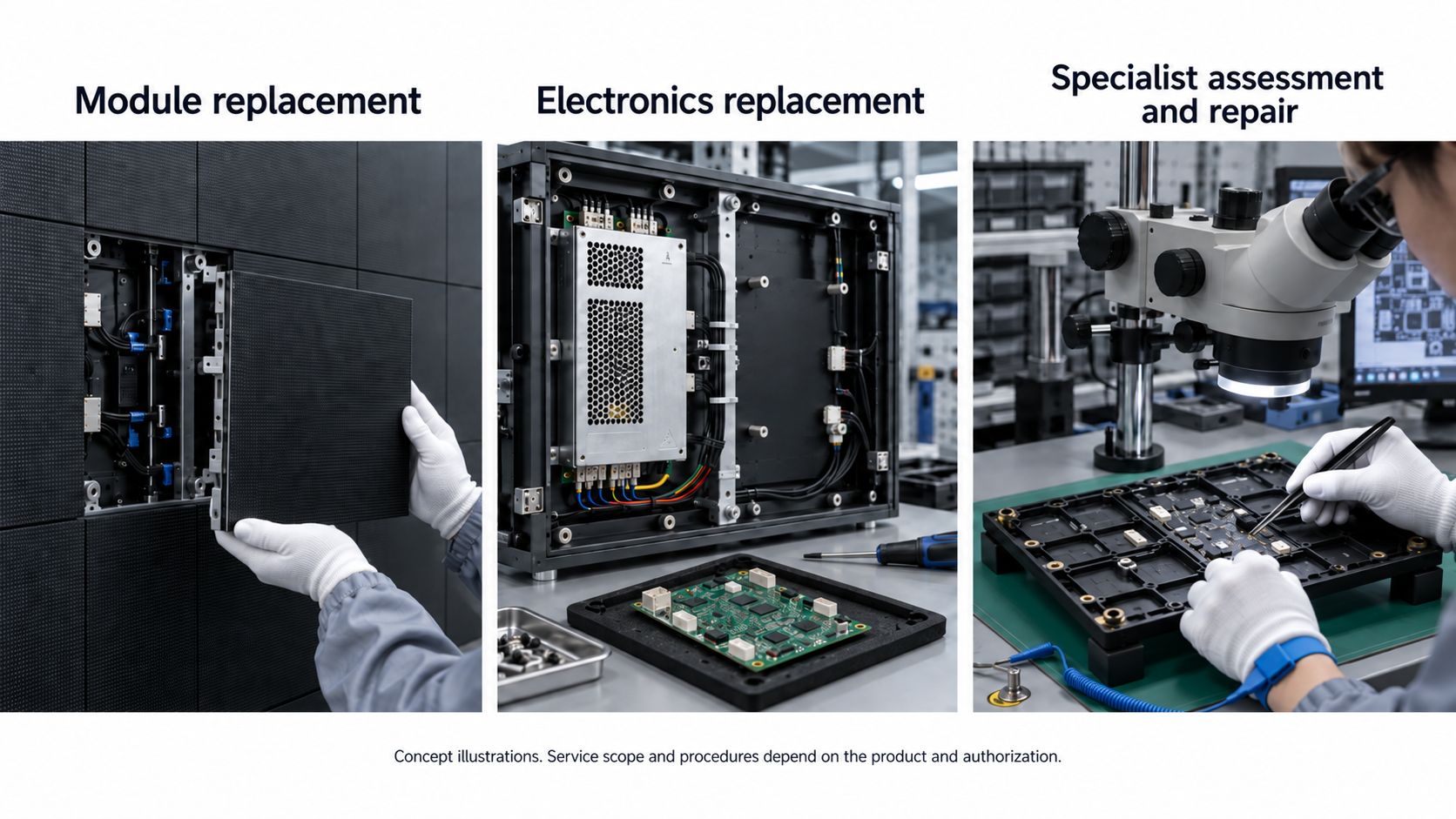 Confirm field replacement authorization, specialist repair channels, repair locations, costs and damage requiring replacement or excluded from the service scope. Technical capability does not establish manufacturer approval or warranty coverage. Front removal does not mean every faulty pixel can be repaired on site. Field replacement restores display operation; repairability of the removed component requires separate assessment.
Request component drawings and replacement procedures. If power and control electronics form one replacement unit, budget for that assembly. If separate, verify access to each.
1.1 Verify Front Service Within the Proposed Installation
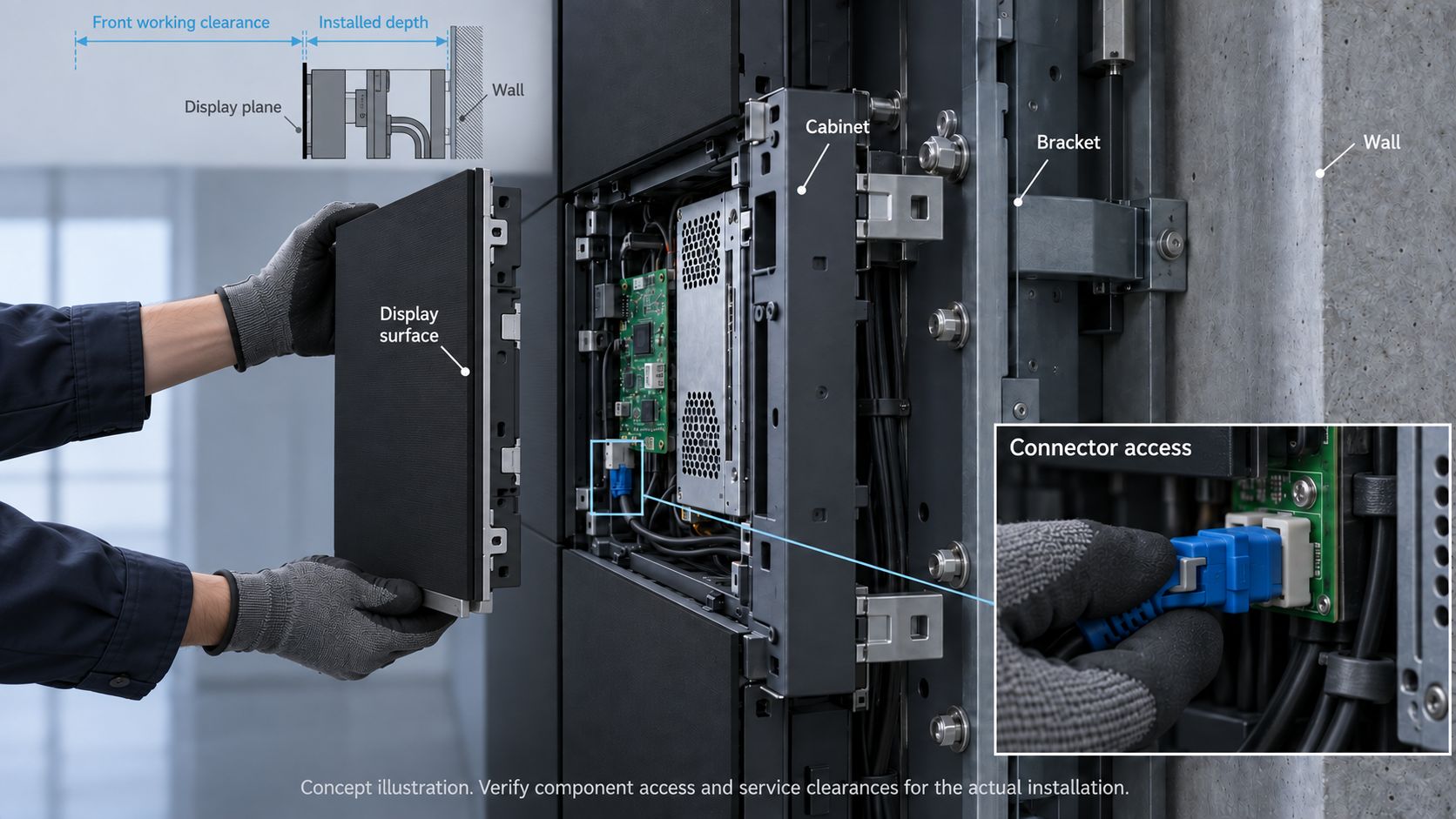
For each component, record what comes off first and whether removal is through the front or rear. Before purchasing, demonstrate replacement on a matching sample with adjacent cabinets, trim and service clearances represented.
Check a central cabinet and positions constrained by corners, trim or technician access. Verify safe standing space, access to fasteners, component support, and removal without contacting adjacent modules.
Demonstrate connector disconnection and reconnection, including latch release and cable clearance. A part fitting through an opening does not prove the complete procedure is practical.
Show required rear access on drawings before finalizing construction. Label installed cabinet, bracket and cable depth separately from front working clearance.
Confirm approved removal tools, contact locations and operating methods. Keep contact surfaces clean and include tools and training in handover. Similar-looking generic suction cups are not automatically suitable.
2. How Should the Display Surface Be Cleaned?
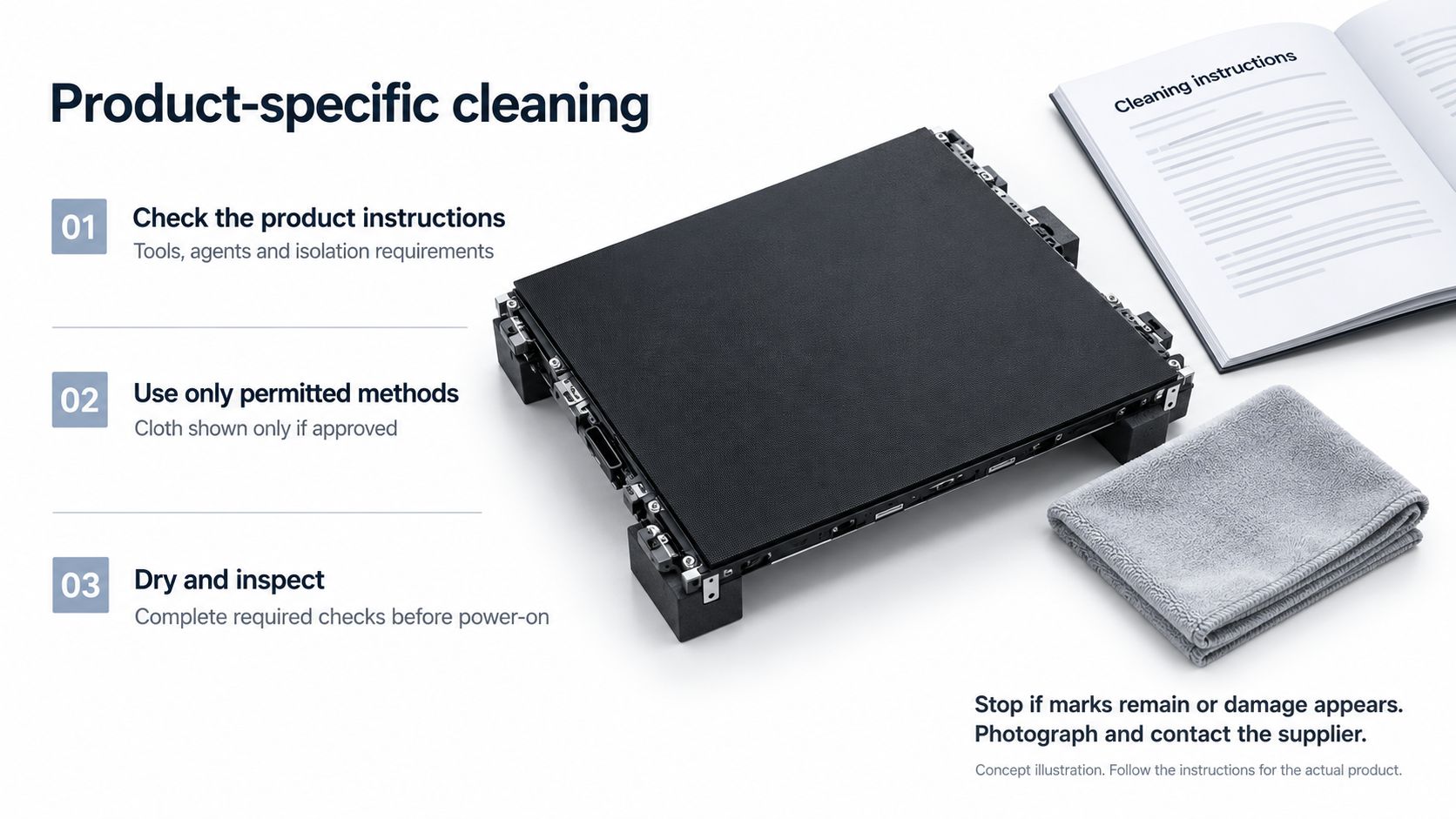
Obtain instructions matching the surface treatment and product revision. Confirm approved cloths or brushes, permitted liquids and concentrations where applicable, handling restrictions, drying requirements, and shutdown or power isolation procedures. Edges, seams and ventilation areas need appropriate methods; surface wiping instructions do not cover cabinet interiors.
A protective COB surface does not establish permission to use water, alcohol, compressed air or heavy wiping pressure. Abrasion resistance, scratch resistance and protection claims do not replace cleaning instructions. Request written guidance where methods are unclear.
Remove dust and adhered contamination using approved procedures. Test on a spare module or designated area only when permitted. For approved wet cleaning, control cloth moisture and prevent liquid entering seams or connectors. Do not independently switch to spraying the display.
Complete drying and inspection before restoring power. Then inspect under site lighting and dark content, which can reveal residue hidden by bright images. If marks remain or scratches, discoloration or coating damage appear, photograph them, stop wiping and contact the supplier.
Set cleaning intervals using manufacturer requirements and actual contamination conditions.
3. How Do You Decide Between Inspection, Replacement and Repair?
Record fault time, cabinet and module positions, content, input path, status indicators and recent changes without interrupting operation. Capture intermittent symptoms where possible.
Follow approved procedures to check upstream sources, processors and power paths. Establish whether the fault follows a signal chain, affects one cabinet or remains local. Record its shape and response to content.
Use test patterns or a known-good source only during authorized maintenance windows. Avoid arbitrary input switching in operating control rooms.
Symptoms alone do not identify the failed component. Qualified personnel must follow product safety procedures for cabinet access, electrical measurements and live diagnostics.
|
Symptom
|
Checks and next decision
|
|
Entire screen or consecutive areas are black
|
Check source, processor output, upstream power, topology and first affected cabinet before investigating downstream parts.
|
|
One cabinet is black or intermittent
|
Compare power and indicators with working cabinets; check accessible connections. Technicians test suspected components according to procedure.
|
|
One or a few pixels are abnormal
|
Record location and color behavior; check permitted colors and gray levels, excluding surface contamination. Apply agreed defect criteria after confirming a module fault.
|
|
Rows, columns or part of a module are abnormal
|
Check the pattern, connections and configuration. Replace a confirmed faulty module with a compatible spare; do not assume one LED chip is responsible.
|
|
Image differs after replacement
|
Check revisions, batches, mapping, settings and calibration. Restore applicable data or recalibrate, then verify acceptance.
|
Label removed parts with location, part number and symptoms. Protect them and confirm repair intake, assessment and treatment of unrepairable parts. Restoring display operation and repairing removed parts are separate workflows; opening encapsulation or soldering chips is not routine field maintenance.
4. How Do You Prepare Compatible Spares and Determine Quantities?
Verify spare compatibility, data recovery and restored image quality. Define inventory requirements, then determine quantities based on the failure scenarios to cover and repair or replenishment lead times.
4.1 Verify Compatibility, Configuration and Calibration Recovery
List modules, power supplies, receiving cards, HUB boards or combined assemblies, cables, connectors and tools for the installed configuration. Obtain a compatibility list covering part numbers, batches, module and PCB revisions, firmware and approved substitutes.
For modules, check mounting dimensions, connector pin assignments, power specifications and configuration matching the driver and scan arrangement. Check power supply outputs, connections and mounting; verify receiving card and HUB interfaces, firmware support and configuration. Matching names, pitch or connector appearance is insufficient.
Identify exportable mapping, controller and receiving card configurations, and calibration data. Record firmware versions and back up valid files with component and position references. For non-exportable data, confirm alternative recovery, hardware and responsible personnel.
Control configuration restores drive parameters and mapping; calibration corrects brightness and color differences. Verify both. For receiving card replacement, confirm restoration of applicable configuration and coefficients. For module replacement, establish the spare’s calibration data source and correct position assignment. Do not assume the removed module’s coefficients suit its replacement.
Confirm whether data resides in modules, cards, controllers or files, and the prerequisites for automatic loading. Deliver usable software, computer requirements, connection tools and permissions. Keep backups current.
Demonstrate recovery using purchased spares and delivered resources. Identify supplier-dependent steps and verify correct display operation after saving and restarting according to procedure.
4.2 Verify the Restored Image
Use matching brightness, white point, gamma and content before and after replacement. Record presets and follow agreed warm-up conditions.
Where permitted, inspect red, green and blue patterns, white fields, grayscale gradients, near-black fields and actual content. Near-black content and low operating brightness are separate variables; repeat checks at lower brightness presets where used.
Compare adjacent areas at agreed distances and angles. Record physical seams separately from image lines. Agree on measurement methods and allowable differences when instruments are required.
Set acceptance criteria before purchasing. Calibration cannot guarantee every later batch will match. Agree on corrective action, costs and timing if results fail, such as further calibration or verified matching replacements.
4.3 Keep Inventory Usable
Follow supplier requirements for packaging, temperature, humidity, electrostatic protection and pressure protection. Record part numbers, revisions, calibration references, inspection status and stock withdrawals. Separate usable, failed and uninspected parts.
Confirm reinspection or startup requirements after extended storage. Check repair records, compatibility, function and image quality before returning repaired parts to usable inventory. A completed repair does not establish immediate replacement readiness.
4.4 Size Inventory Around Required Fault Coverage
Agree how many successive failures each component inventory must cover, remaining stock after replacement, and repair or replenishment lead times.
If a second identical failure must be handled immediately while the first failed part is away, start with at least two usable spares. One remains after the first replacement. This is a service scenario, not a universal percentage or failure forecast.
Consider installed quantities, failure consequences, location and contract requirements. Define simultaneous failures separately and set replenishment triggers.
Rental projects need protected, traceable spares between events. Fixed installations may permit scheduled maintenance; control rooms need after-hours response and immediate inventory.
Include inventory, labor, logistics, repair and downtime consequences in the long-term total cost of a COB LED display.
5. Can Maintenance Meet Your Downtime Requirements?
To meet agreed downtime requirements, define preventive checks, recovery roles and support resources, and verify recovery times through rehearsals. Confirm feasibility before purchase and at handover, and document service scope and responsibilities in the contract.
5.1 What Should Be Checked Before a Fault Occurs?
Build preventive inspections around ventilation, fans or filters where fitted, visible cable damage, abnormal status records, and power connections requiring qualified inspection. Set intervals using manufacturer requirements, environmental conditions, operating hours and history. Record results and responsibilities; investigate recurring overheating or intermittent faults.
5.2 Who Is Responsible for Recovery After a Fault?
Train personnel to record faults and preserve configuration, avoiding trial-and-error changes on an operating display. Define diagnostic access, available monitoring, support hours and configuration-change authority. Identify spare locations, after-hours contacts and remote-stock transport arrangements. Supplier response and display recovery need separate commitments.
Rehearse and measure fault detection and localization, spare retrieval and transport, safe replacement, and configuration and calibration recovery with image acceptance. Also record actual downtime and its agreed starting point because activities may overlap.
Define temporary business recovery, full display restoration and final acceptance separately. Agree essential content, temporarily acceptable defects and duration limits. Lighting up alone does not establish completion.
Assign responsibility for failed-part dispatch, repair assessment, return inspection and replenishment after operation resumes.
5.3 Verify Before Purchasing and Recheck at Handover
Obtain matching maintenance and recovery documentation. Demonstrate procedures within the proposed structure and resolve open access conditions before finalizing installation.
Review tests used to verify reliability against the intended environment. Record reliability tests and service demonstrations separately: they answer different questions.
At handover, actual service personnel should replace specified components in the finished installation and restore the image using agreed resources. Record obstructions, missing tools, assistance and timings in the COB LED display purchasing, testing and acceptance checklist .
Contracts should define support hours, approved work, labor, transport, cross-border costs, temporary replacements and repair responsibilities. Available services are not automatically free or covered by warranty.
6. Frequently Asked Questions
A1: Can Alcohol Remove Stubborn Marks?
Q1: Only when product instructions permit the agent, concentration and method. If marks remain, stop wiping and request written guidance.
Q2: Does One Faulty Pixel Require Module Replacement?
A2: Apply agreed defect criteria and available repair options. Confirm intervention thresholds, field recovery, authorization and repair arrangements; do not assume on-site chip repair.
Q3: Can Any Suction Cup Remove a Front-Service Module?
A3: No. Verify approved tools, contact positions and removal paths, then recheck with installed trim and adjacent modules.
Q4: Can Later-Batch Modules of the Same Model Be Installed Directly?
A4: Confirm mechanical, electrical and control compatibility and applicable calibration data. Check image consistency afterward; a matching model name is insufficient.
Q5: Can Receiving Cards or Modules Be Hot-Swapped?
A5: Follow written product procedures. Black content does not de-energize circuits. Unless powered replacement is explicitly permitted, isolate the relevant circuits and use appropriately qualified personnel.
7. Conclusion
A maintainable COB LED display lets technicians clean safely, access parts and restore agreed image quality within the required time. Verify access, compatible spares and recovery before purchasing, then recheck the finished installation.
Send Premteco your mounting structure, on-site maintenance capabilities and permitted downtime. We can help confirm suitable service procedures, spare-parts provision and acceptance checks.




