Choosing an LED display for a church is not simply a matter of selecting the highest resolution or the brightest screen.
A sanctuary has very different requirements from a retail store, advertising billboard, or concert stage. The display must remain clear from the back row, comfortable to watch during worship, quiet during prayer and acoustic performances, reliable for weekly services, and easy for staff or volunteers to operate and maintain.
This guide explains how to evaluate each factor and select an LED display that fits your church instead of simply buying the highest specification available.
Start With the Installation Environment
Before comparing pixel pitch, brightness, or technical specifications, the first step is to understand the actual environment where the LED display will be installed.
Many churches make purchasing decisions based only on product specifications, such as choosing the smallest pixel pitch or the highest resolution available. However, the best LED display solution is not determined by the highest specifications. It is determined by how clearly and comfortably the audience can experience the content.
Before selecting an LED wall, consider the following factors:
Viewing distance from the front and rear seating areas
Available installation space
Type of content displayed during worship services
Whether the screen will be used for livestreaming or professional camera recording
A successful church LED installation starts with understanding the environment first, then selecting the appropriate display parameters based on actual usage requirements.
Viewing Distance: The Key Factor That Determines Pixel Pitch
Viewing distance is the most important factor when selecting pixel pitch for a church LED display.
Pixel pitch should not be selected simply because a smaller number appears more advanced. Instead, it should be calculated according to how close viewers will sit from the screen.
A practical formula is:
Minimum viewing distance (m) ≈ Pixel Pitch (mm) × 1
For a more comfortable viewing experience:
Comfortable viewing distance (m) ≈ Pixel Pitch (mm) × 2 - 3
For example:
A P2.5 LED display is generally suitable for comfortable viewing distances of approximately 5 - 7.5 meters.
A P1.8 LED display provides higher image detail for audiences viewing from around 3.6 - 5.4 meters.
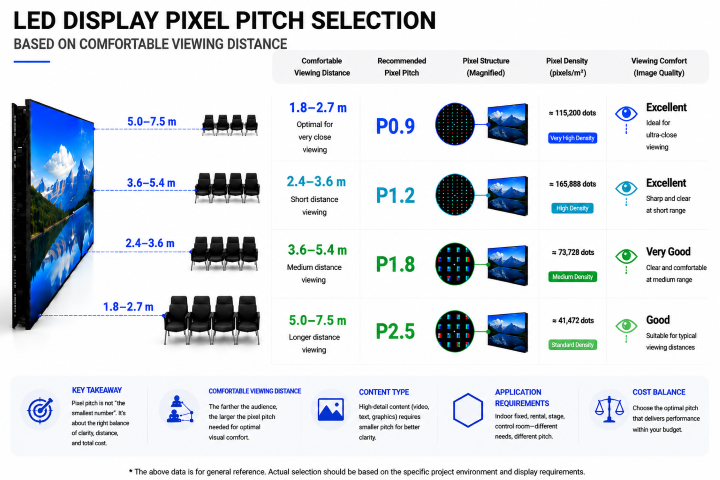
These values are design guidelines rather than strict requirements. The final decision should also consider ambient lighting, camera usage, content complexity, and audience expectations.
Choose the Right Pixel Pitch for Worship Content
Pixel pitch directly affects image detail, viewing experience, and project cost.
For church applications, a smaller pixel pitch can provide smoother images and clearer text, especially when displaying: Worship lyrics, Sermon notes, Bible verses, Close-up camera images Detailed visual backgrounds.
However, choosing the smallest pixel pitch is not always the most economical solution.
A finer pixel pitch requires significantly more LED chips per square meter, which increases cabinet cost and overall project investment.
For example, a P1.2 display contains much higher pixel density than a P1.5 display, and upgrading from P1.5 to P1.2 may increase the screen cost by approximately 30-50%, depending on product configuration.
If two pixel pitches can both provide a clear viewing experience at the actual audience distance, selecting the smaller one may not create enough visible improvement to justify the additional investment.
Balance Pixel Pitch, Screen Size, and Content Resolution
Pixel pitch should always be evaluated together with screen size and signal source.
These three factors work together:
Screen size determines the physical viewing area.
Pixel pitch determines image density and clarity.
Signal source resolution determines how much image detail can actually be displayed.
A finer pixel pitch becomes more valuable when:
The audience sits close to the LED wall.
The display shows detailed graphics frequently.
The screen is used for professional livestreaming or camera recording.
For most churches, the ideal LED display is not the one with the smallest pixel pitch, but the one that provides the right balance between image quality, viewing comfort, installation requirements, and budget efficiency.
Note: All recommended values are engineering guidelines rather than absolute standards. Actual selection should be based on the church environment, content requirements, lighting conditions, and user expectations.
Choose the Right LED Screen Size
The number of seats alone does not determine the required screen size. A 500-seat church does not automatically need one specific LED wall dimension. Screen size should be determined by the auditorium layout, viewing distance, stage width, aspect ratio, and the type of content displayed.
How Large Should a Church LED Screen Be?
For reference, a typical church installation may fall within the following ranges:
|
Congregation Size
|
Typical Screen Width
|
Typical Pixel Pitch
|
Typical Brightness
|
|
Under 150 seats
|
3 - 4 m
|
P2.5 - P3.0
|
800 - 1,000 nits
|
|
150 - 300 seats
|
4 - 5.5 m
|
P2.5 - P3.9
|
1,000 - 1,200 nits
|
|
300 - 600 seats
|
5.5 - 7 m
|
P2.5 - P3.9
|
1,200 - 1,500 nits
|
|
600 - 1,500 seats
|
7 - 10 m
|
P2.5 - P3.9
|
1,200 - 1,500+ nits
|
|
Large IMAG / multi-screen
|
10 m+
|
P1.8 - P2.9
|
1,500+ nits
|
These are starting points rather than fixed specifications. A smaller sanctuary with a very close front row may require a finer pixel pitch, while a large auditorium with long viewing distances can often use a coarser pitch more economically.
Example (500-Seat Sanctuary): A screen 5.5-7 m wide is a good evaluation baseline. However, row distances are key: if the front row is only 3-4 m away, P2.5 or finer is ideal. If most viewers sit 8 - 12 m away, P2.9 - P3.9 provides sufficient image quality without unnecessary cost.
How Bright Should a Church LED Screen Be?
Brightness is measured in nits (cd/m²), while ambient light is normally measured in lux. The appropriate brightness level depends on the installation environment, rather than simply choosing the highest value listed on the datasheet.
Higher Brightness Is Not Always Better
An excessively bright screen in a dim sanctuary causes eye fatigue, glare, and camera overexposure. Conversely, a display that is too dim will look washed out in direct sunlight or strong indoor lighting.
For most indoor church applications, a practical target is approximately 800 - 1,500 nits, depending on ambient lighting. Daylight-heavy sanctuaries may require higher brightness, while darker worship environments can operate comfortably at lower levels.
|
Environment
|
Suggested Brightness
|
|
Dark worship hall
|
800 - 1,000 nits
|
|
Typical indoor sanctuary
|
1,000 - 1,500 nits
|
|
Bright / daylight-heavy sanctuary
|
1,500 - 2,000+ nits
|
|
Strong natural-light environment
|
Up to 2,000 - 3,500 nits
|
|
Outdoor church events
|
Generally 4,000+ nits
|
Tip: Choose a screen with adjustable brightness. Running a higher-cap screen at lower intensity extends its lifespan.
Why Fanless Design Matters in a Church
Churches have very different acoustic requirements compared with shopping malls or outdoor advertising displays.
During prayer, sermons, or vocal worship, fan noise can become quite noticeable and affect the overall experience. Therefore, for indoor church LED projects, natural cooling or low-speed fan solutions should be prioritized whenever the thermal design allows.
How Much Noise Is Acceptable?
A quiet sanctuary has an ambient noise floor of around 25 - 35 dB(A). Fan-cooled LED power supplies produce 40 - 52 dB(A), which is noticeably distracting. For noise-sensitive environments, aim for <25 dB(A) at 1 meter.
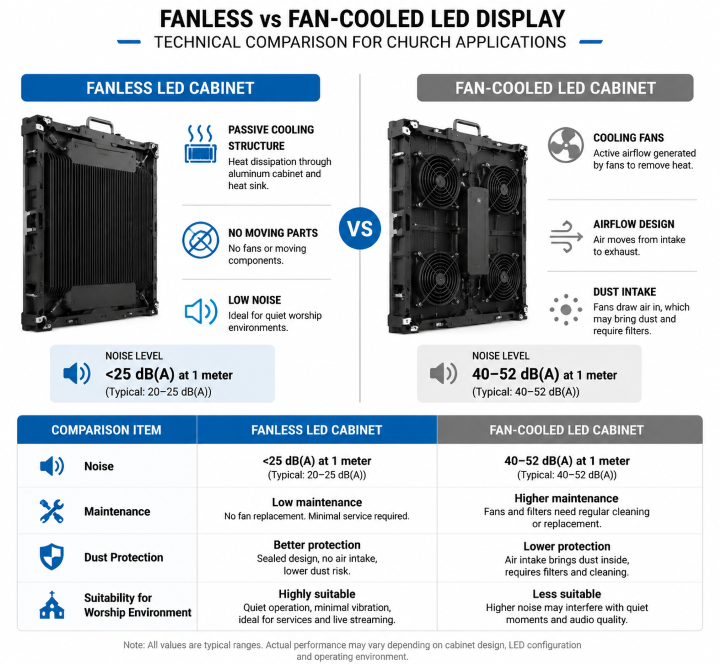
Purchasing Note: Ensure the supplier confirms that both the power supply and cabinets are 100% passively cooled. Passive designs carry a roughly 8 - 15% cabinet premium, but it is well worth the investment for acoustic environments.
Refresh Rate: Essential for Live Streaming and Camera Use
If your church livestreams, uses IMAG (Image Magnification), or records services, refresh rate is critical to avoid visible scan lines and camera flicker.
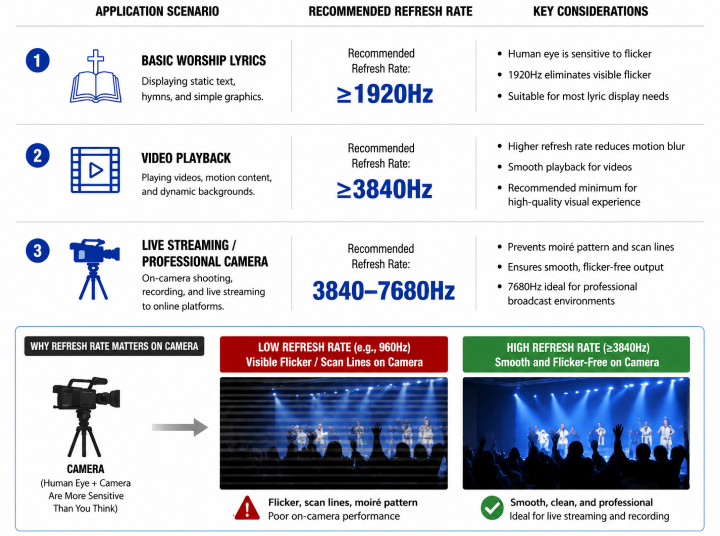
If the church mainly displays lyrics and static graphics without camera capture, extremely high refresh rates may provide limited practical benefit.
If livestreaming is an important part of weekly services, 3,840 Hz should be considered. Maintenance Design Can Reduce Long-Term Costs
A church LED display may operate for many years, so serviceability should be evaluated before purchase.
Front Maintenance vs. Rear Maintenance
|
Feature
|
Front Maintenance
|
Rear Maintenance
|
|
Wall-mounted installation
|
Excellent
|
Difficult
|
|
Limited rear access
|
Excellent
|
Poor
|
|
Module replacement
|
Convenient
|
Requires rear access
|
|
Installation flexibility
|
High
|
Medium
|
|
Recommended for permanent wall
|
Highly Recommended
|
Only with rear access
|
For an LED wall mounted directly against a church wall, front maintenance is usually the safer specification.
The cabinet should also provide secure module retention, reliable connectors, accurate cabinet alignment, and easy access to key components.
These details may not appear in the headline specification, but they have a direct impact on future service costs.
Consider Total Cost of Ownership
The upfront quote is only part of the investment. A complete TCO evaluation includes:
LED cabinets and modules
Video processor & controllers
Mounting structure & installation
Electricity consumption
Spare parts kit (modules, power units)
Maintenance labor
Energy-saving tip: Technologies like Common Cathode can reduce power consumption and heat output by 20 - 30%, lowering operating costs and ambient heat.
Key Question: Don't ask "What is the cheapest LED screen?" Ask "What configuration offers the best balance of image quality, reliability, low noise, and serviceability over its lifespan?"
Recommended Church LED Display Configurations
Based on the factors above, the following configurations can serve as practical starting points:
|
Church Application
|
Recommended Starting Configuration
|
|
Small chapel
|
P1.8 - P2.5, 800 - 1,000 nits, ≥3,840 Hz
|
|
Medium sanctuary
|
P2.5 - P2.9, 1,000 - 1,500 nits, ≥3,840 Hz
|
|
Large auditorium
|
P2.9 - P3.9, 1,200 - 2,000 nits, ≥3,840 Hz
|
|
Live-streaming church
|
P2.5 - P2.9, high refresh rate, camera-friendly processing
|
|
Daylight-heavy sanctuary
|
P2.9 - P3.9, higher brightness, strong contrast
|
|
Noise-sensitive sanctuary
|
Fanless design, preferably <25 dB(A) at 1 m
|
|
Wall-mounted installation
|
Front-maintenance cabinet
|
These configurations should be refined after measuring the actual installation site.
Conclusion
Choosing an LED display is a process of matching technology to your specific worship space. Before requesting quotes, make sure you have identified:
1. Viewing distances (first and last row)
2. Available mounting dimensions
3. Target pixel pitch
4. Room ambient light & required brightness
5. Refresh rate & livestreaming requirements
6. Noise sensitivity (fanless needs)
7. Maintenance access (front vs. rear)
A well-designed church LED display shouldn't distract from worship. It should clearly communicate lyrics, scripture, and visuals while remaining quiet, reliable, and easy to run.
Need Help Choosing the Right LED Display? Contact Premteco today to discuss your church LED display project and find the right solution for your space.




