Selecting a COB LED video wall for a control room is not about choosing the highest specifications. It is about keeping maps, alarms, and operational data readable around the clock, then restoring service within an agreed timeframe after a failure. Fine pixel pitch, high peak brightness, and a “24/7-rated” label do not, by themselves, prove mission-critical suitability.
In real-world projects, buyers typically face three questions: whether finer pixel pitch justifies its cost, whether low-brightness operation preserves grayscale and color, and whether heat, spare-part compatibility, and service delays threaten uptime. Because these concerns mostly arise from direct-view LED applications in general, they should not be treated as COB-specific failure data.
Evaluate the complete system in sequence: content requirements, operational image quality, failure coverage, recovery capability, facility resources, and acceptance evidence.
1. Display Tasks and Pixel Budget
The first question is straightforward: what information must remain readable from the farthest operator position? Providing the supplier with real content, wall dimensions, viewing positions, and proposed window layouts is more useful than simply asking for the smallest recommended pixel pitch.
| Display task |
What to examine |
Common risk |
|
Maps
|
Road lines, place names, and layer relationships
|
Fine lines and labels disappear after scaling
|
|
Alarms
|
Severity, text, location, and status changes
|
Operators see the color but cannot read the event
|
|
Data tables
|
Minimum character size, rows, columns, and numbers
|
Dense information becomes ambiguous at a distance
|
|
Multi-window layouts
|
Pixels per window, aspect ratio, borders, and toolbars
|
The input is sharp, but individual windows remain blurred
|
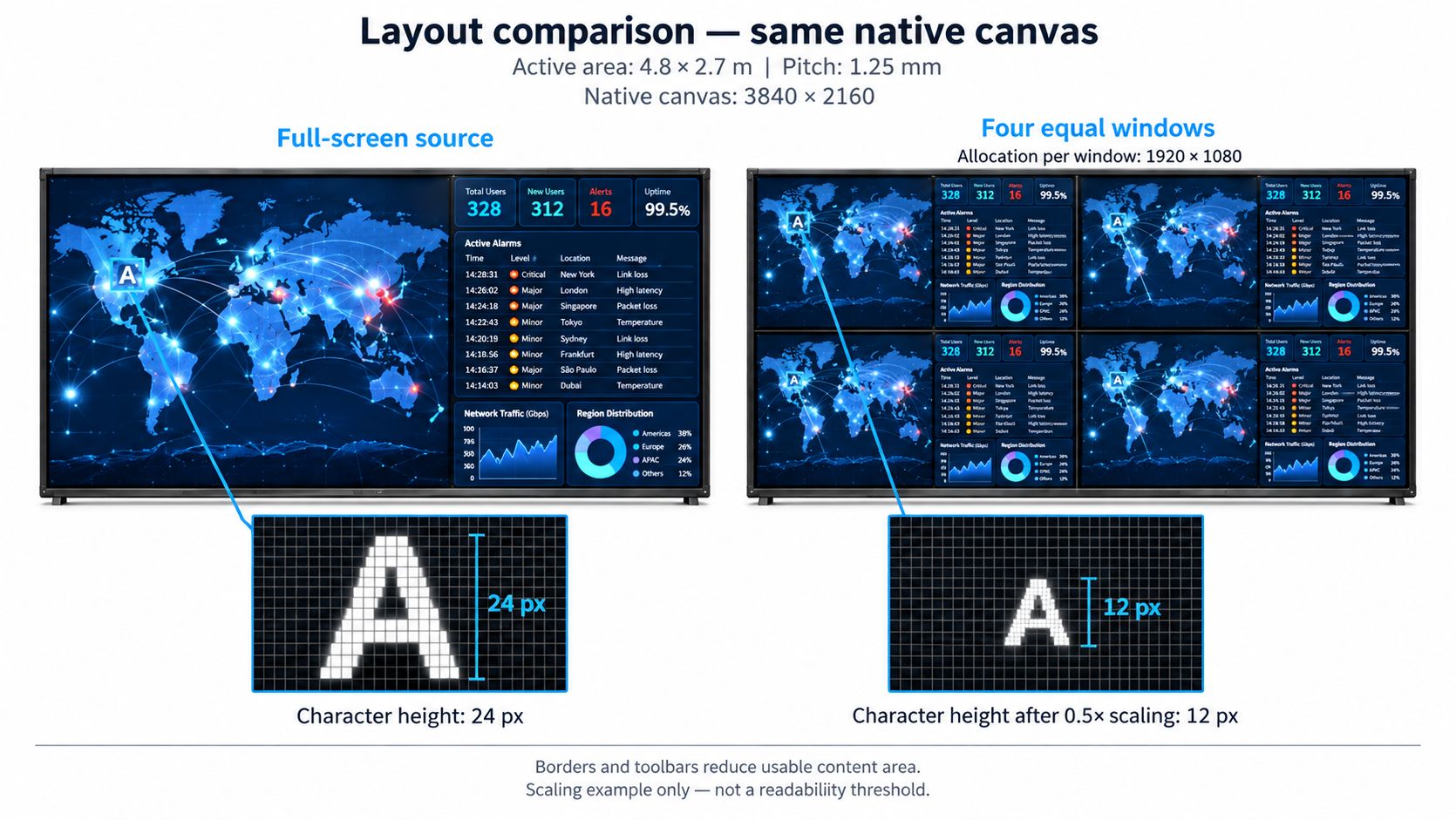
Three resolutions must be distinguished: input signal resolution, native video wall resolution, and the actual pixel allocation for each window. A processor that accepts a 4K input does not necessarily drive a native 4K wall. It certainly does not mean that every window in a multi-window layout can display 4K detail.
Pixel-budget example: Assume that the active display area measures 4.8 × 2.7 meters and uses a 1.25 mm pixel pitch. If the module arrangement aligns exactly with those dimensions, the native resolution is approximately 3840 × 2160 pixels. When the canvas is divided into four equal windows, each window receives no more than 1920 × 1080 pixels. A source character that is 24 pixels high becomes only 12 pixels high when the complete 4K source is reduced by half. Window borders and toolbars reduce the usable area further. This example illustrates the calculation method; it is not a universal font-size standard.
Use COB LED Pixel Pitch: How to Choose for Your Viewing Distance to shortlist suitable pixel pitches based on the nearest, farthest, and off-axis operator positions. Then use COB LED Wall Size and Resolution: How Pixel Pitch Determines 4K to verify the physical dimensions, module count, and native resolution.
Required output: Confirm the maximum number of simultaneous windows, minimum critical text size, native pixel grid, and required viewing range. If the budget is constrained, compare the results of changing the layout, enlarging critical content, and reducing pixel pitch. More pixels also increase processing and transmission requirements. The same content must be carried forward into the image-quality test.
2. Operational Brightness and Low-Gray Performance
A sufficient pixel count does not guarantee clear dark-mode content. Control rooms rarely need continuous peak brightness, so grayscale, color stability, and module uniformity must be evaluated at the intended operating brightness.
Excessive brightness increases visual fatigue and heat, while excessive dimming can hide shadow detail. Reflections from lights, windows, and glass partitions may further reduce contrast. The COB surface must therefore be assessed in the actual room.
Low-brightness performance depends on drive current, PWM dimming, grayscale bit depth, scan design, video processing, and calibration. High refresh rate or claimed 16-bit grayscale does not, by itself, guarantee smooth low-gray reproduction.
Using the content defined in Section 1, check:
Shadow detail: Can operators distinguish near-black areas without visible banding?
Uniformity: Do gray and solid-color patterns reveal brightness or color differences?
Alarm recognition: Are colors and text readable from distant and off-axis positions?
Reflections: Does ambient light obstruct information or cause discomfort?
Eliminate source, color-space, and scaling issues before blaming the wall. Record the approved day/night presets, lighting conditions, calibration settings, and test content as the failover image-quality baseline.
3. Redundancy and Failure Coverage
Redundancy must be defined by failure domain. Dual power supplies, dual inputs, backup signal paths, and standby processors protect different parts of the system; they are not interchangeable. COB packaging protects the pixel layer, not the complete signal and power chain.
Ask the supplier to document the source-to-display topology and identify:
Power: What does the backup supply cover, and is its remaining capacity sufficient?
Signal: Does redundancy protect only the cable and port, or the sending device as well?
Control: What remains visible if the processor, control computer, or content source fails?
Display: How much of the wall is affected by a receiving-card, HUB-board, connector, or module failure?
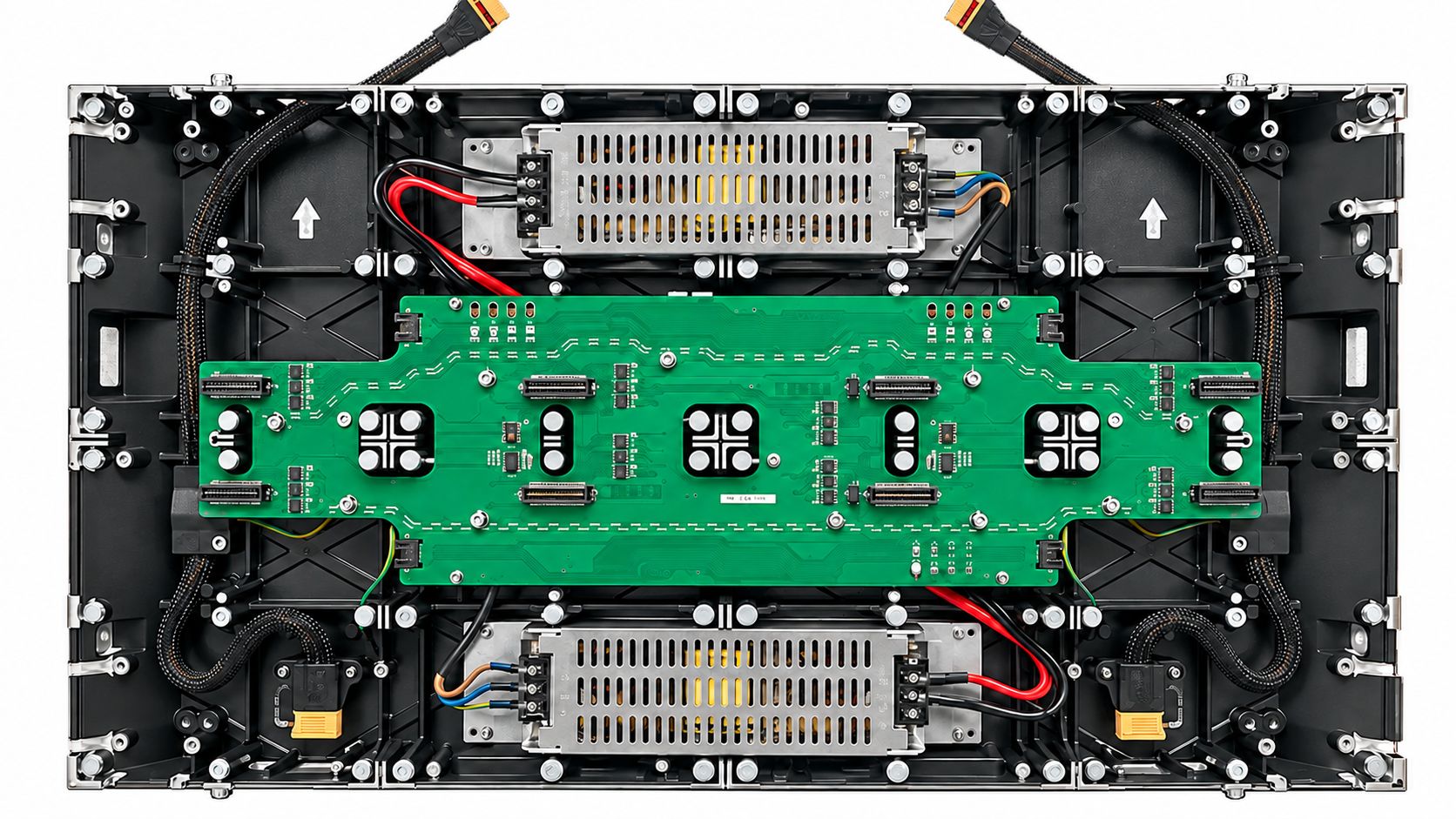
Check for common-mode failures. Primary and backup resources may still share a branch circuit, processor, cable route, network switch, cooling system, or configuration dependency.
Verify redundancy using the installed hardware, firmware, wiring, and operating mode. For architecture trade-offs, see Integrated vs Separate COB Display Electronics: Which Design Fits Your Project.
MTBF does not define recovery time. Procurement requirements should specify failover method, permitted interruption, alarm behavior, degraded-display limits, and recovery procedure.
Required output: Create a failure-coverage matrix showing the affected area, detection method, switchover action, and recovery process for each failure.
4. Maintenance and Recovery Time
“Full front service” is meaningful only when access is confirmed component by component. A front-removable LED module does not prove that the power supply, receiving card, HUB board, cables, or connectors are also front-accessible. Rear ventilation, cable clearance, and access to external equipment may still be required.
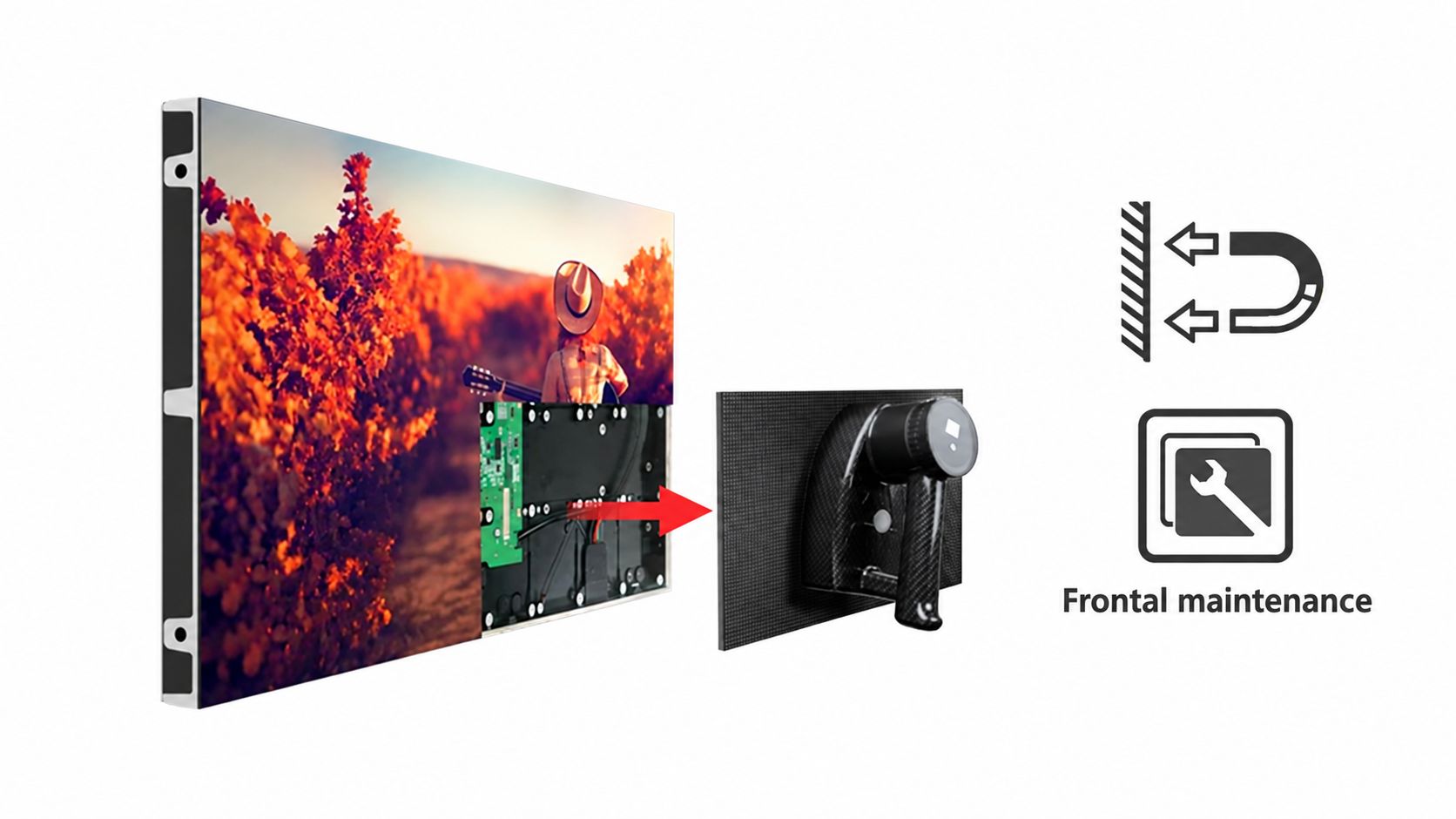
Before acceptance, demonstrate maintenance using the final mounting structure. Record the tools, technicians, working space, replacement time, and affected display area. Approved procedures and training should be included in the handover.
On-site module replacement is different from internal COB repair. Chip-level repair generally requires specialized equipment, so site teams normally replace complete components.
The spare-parts plan should confirm:
Model, hardware, interface, and connection compatibility
Quantity based on failure impact and repair turnaround
Management of brightness, color, and surface differences
Storage and recovery of configuration, mapping, firmware, and calibration data
A spare that illuminates may still create a visible patch. Demonstrate replacement with project spares and verify whether recalibration is required.
Service terms should separately define fault response, technician arrival, spare delivery, and display restoration. Warranty duration does not replace a recovery commitment. See COB LED Display: Maintenance Repair Cleaning and Spare Parts for further planning guidance.
Required output: Provide a verified replacement procedure, configuration backups, compatible spares, training records, and defined service times.
5. Power, Heat, and Noise
Continuous operation requires the complete system to remain within its electrical and environmental limits. Maximum rated power, power measured under a stated test condition, and actual operating power are different values. Supplier figures are comparable only when brightness, content load, image mode, and measurement boundary are consistent. A full-white maximum figure for one product should not be compared directly with a dark-interface operating figure for another.
Reduced power consumption may result from flip-chip COB, common-cathode driving, efficient driver ICs, or the power architecture. None of these terms alone proves that the complete wall will use less energy. Total system input should include the display, controller, processing equipment, and remote power supplies.
The facility review should cover the entire system:
Electrical capacity: Include the display, processors, control equipment, and standby resources. Qualified electrical personnel should verify continuous load, startup behavior, protective devices, and backup capacity. Average power can support operating-cost estimates but should not be used alone to size the electrical supply.
Heat and airflow: Measure stabilized temperatures behind the wall, around the power equipment, and inside racks. Confirm the inlet path, return-air path, local hot spots, and maintenance clearance. The room thermostat does not represent the inlet temperature of every device.
Operator-area noise: Assess the display, processors, power racks, and HVAC under representative content and cooling loads. A fanless display does not make the complete system silent.
Continuous-run conditions: Confirm humidity, condensation risk, dust control, cleaning intervals, and restart behavior after a power interruption. The system must remain within its limits while standby resources are carrying the load.
Remote power equipment relocates heat and noise; it does not eliminate them. The equipment room must still dissipate the transferred thermal load. Rated LED lifetime and MTBF values cannot substitute for evidence of continuous operation under the project’s environmental conditions.
Required output: Complete the electrical calculation, define temperature measurement points, document airflow and acoustic requirements, and establish the allowable operating envelope. The content, brightness presets, redundancy state, and environmental limits from the first five stages must now be converted into acceptance tests.
6. Acceptance Testing and Operational Records
Acceptance testing must prove that the system meets its operational requirements. Test content, operator positions, lighting, brightness, system versions, measurement methods, and pass criteria should be agreed before procurement.
6.1 Factory Acceptance Test
The FAT should verify pixel mapping, content readability, low-brightness uniformity, configuration backups, spare-part compatibility, and redundancy logic. Use the project controller, receiving system, and representative modules whenever possible. Record software versions, brightness, color temperature, test content, and results. Promotional video alone cannot prove control-room suitability.
6.2 Site Acceptance Test
Conduct the SAT under the final lighting, power, cooling, network, and viewing conditions:
Readability: Test maps, alarms, tables, and video in the maximum window layout.
Image quality: Check day/night presets, low-gray detail, uniformity, reflections, and off-axis viewing.
Failover: Simulate approved power, signal, and control failures; record detection, switchover, impact, and recovery.
Maintenance: Replace a project spare, restore its configuration, and verify calibration.
Long-duration operation: Log power, temperature, alarms, restarts, and abnormal events.
Define test duration, sampling intervals, limits, and permitted downtime for the project. Correct and retest every exception.
The handover package should include system topology, failure coverage, configuration and calibration files, spares, maintenance procedures, training records, FAT/SAT results, and operating logs. A qualified system must keep content readable, contain failures, and support verified recovery.
7. Frequently Asked Questions About 24/7 Control Rooms
Q1. What pixel pitch is best for a control-room video wall?
A1: The correct pixel pitch depends on viewing distance, wall size, smallest critical text, map detail, and multi-window layouts. Test actual operational content from the nearest, farthest, and off-axis operator positions.
Q2. Does a 4K input produce a native 4K LED wall?
A2: Not necessarily. A 4K input only describes the source signal. Native wall resolution depends on physical dimensions, pixel pitch, and module configuration. Each window receives only part of the total pixel canvas.
Q3. What redundancy does a control-room LED wall need?
A3: Review power, signal, control, processing, and display-level redundancy separately. Also identify shared branch circuits, processors, switches, cable routes, cooling systems, and other common-mode failure points.
Q4. Does full front service cover every component?
A4: Not always. Front-removable modules do not guarantee front access to power supplies, receiving cards, HUB boards, cables, or connectors. Confirm access component by component using the final mounting structure.
8. Conclusion
A COB LED video wall is suitable for 24/7 control rooms only when content readability, low-brightness image quality, redundancy, maintenance, power, and cooling are verified as one system. Choose the solution that keeps information readable, limits failure impact, and supports proven recovery.
Planning a 24/7 control-room video wall?
Send Premteco your content requirements, wall dimensions, viewing distances, operating environment, and recovery targets for a project-specific COB LED evaluation.




